Automating Excel with C# in LINQPad: A Free and Simple Guide for .NET Developers
In the world of .NET development, working with Excel files programmatically is a common task—whether you’re generating reports, analyzing data, or automating workflows. But if you’ve ever searched for “C# Excel automation” or “read Excel files in C#,” you’ve likely encountered a mix of outdated advice, complex libraries, or even paid solutions. As of 2025, there’s still a straightforward, completely free way to handle this using the built-in Microsoft Office Interop libraries, provided you have Excel (or Office 365) installed on your machine.
And what better tool to prototype and test this than LINQPad? LINQPad excels (pun intended) as a lightweight script host for .NET code, making it ideal for quick demos, debugging, and exploring APIs like Microsoft.Office.Interop.Excel. In this post, we’ll walk through how to set up LINQPad for Excel integration, add the necessary NuGet package, and use sample C# code to open workbooks, read worksheets, and extract cell data.
Why Use Microsoft.Office.Interop.Excel in LINQPad?
Before diving into the code, let’s address why this method stands out:
- Completely Free: No need for third-party libraries like
EPPlusorClosedXMLif you already have Office installed. The Interop assemblies come bundled with Excel. - Full Control: You get direct access to Excel’s COM API, allowing automation of everything from opening files to manipulating cells, charts, and more.
- LINQPad’s Strengths: As a .NET Rapid Application Development tool, LINQPad supports NuGet references out of the box, interactive visualization of data results, and rapid iteration—making it superior for learning, prototyping and testing compared to full IDEs like Visual Studio or JetBrains Rider.
- Relevance in 2025: Despite newer options like OpenXML, Interop remains viable for scenarios requiring the full Excel engine, especially on machines with Office pre-installed.
Setting Up LINQPad for Excel Automation
To get started, ensure you have:
- Excel or Office 365 installed (the Interop libraries rely on this).
- LINQPad 9 (Premium).
Download LINQPad Today
Get started with the most powerful .NET Rapid Progress Tool (RPT) available.
Get LINQPad PremiumPowerful .NET acceleration. Code at the speed of thought.
Step 1: Add the NuGet Reference
In LINQPad, press F4 to open the Query Properties dialog. Under “Additional NuGet Packages,” search for and add Microsoft.Office.Interop.Excel. This package provides the primary interop assemblies (PIAs) for Excel, allowing your C# code to interact with the application.
Once added, you’re ready to script!
Sample C# Code: Opening Workbooks, Reading Worksheets, and Cells in LINQPad
Here’s a complete, runnable example in LINQPad. This script opens an Excel file, lists the worksheet names, reads the used range into a list of lists (representing rows and columns), and dumps the results for easy visualization.
Make sure to replace the file path (fn) with your own Excel file location. For testing, create a simple .xlsx file with some data.
using System.Collections.Generic;
using System.Linq;

using Excel = Microsoft.Office.Interop.Excel

// Define the file path to your Excel workbook
string fn = @"C:\Users\ryan.rodemoyer\AppData\Local\Temp\tmpabq2cd.tmp.xlsx";

// Create a new Excel application instance
Excel.Application excel = new Excel.Application();
Excel.Workbook wb = excel.Workbooks.Open(fn);

// Get the worksheets as an enumerable
IEnumerable<Excel.Worksheet> sheets = wb.Sheets
    .Cast<Excel.Worksheet>();

// Dump worksheet names
sheets
    .Select(x => new { x.Name })
    .ToList()
    .Dump("Worksheets");

// Read cells from the used range into a list of lists
var cellsResult = sheets
    .Select(x => new
    {
        rowCount = x.UsedRange.Rows.Count,
        colCount = x.UsedRange.Columns.Count,
        cells = Enumerable.Range(1, x.UsedRange.Rows.Count)
            .Select(r => Enumerable.Range(1, x.UsedRange.Columns.Count)
                .Select(c => ((Excel.Range)x.Cells[r, c]).Value2)
                .ToList())
            .ToList(),
    })
    .ToList();

// Clean up: Close workbook and quit Excel
wb.Close(false);
excel.Quit();

// Dump the cell data from the first sheet
Util.HorizontalRun(withGaps: true, cellsResult.First().cells).Dump("Used Range");
Breaking Down the Code
- Opening the Workbook: We instantiate
Excel.Applicationand useWorkbooks.Open()to load the file. This requires Excel installed, as it launches an invisible instance. - Reading Worksheets: Casting
wb.SheetstoIEnumerable<Excel.Worksheet>lets us use LINQ for querying sheet names—showcasing LINQPad’s power with LINQ expressions. - Reading Cells: We determine the used range with
UsedRange.Rows.CountandUsedRange.Columns.Count, then iterate over rows and columns to extract values usingCells[r, c].Value2. This builds a 2D list for easy manipulation. - Cleanup: Always close the workbook and quit the app to avoid lingering processes.
- Dumping Results: LINQPad’s
.Dump()method visualizes data interactively, perfect for debugging “LINQPad Excel data extraction” scenarios.
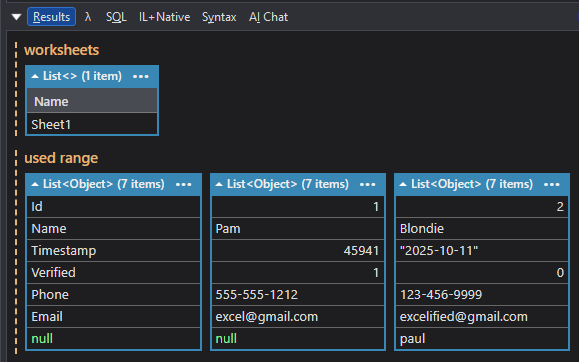
Run this in LINQPad, and you’ll see the worksheets listed and the cell data rendered in a readable format. For larger files, consider error handling or performance tweaks, but this base script handles most simple use cases.
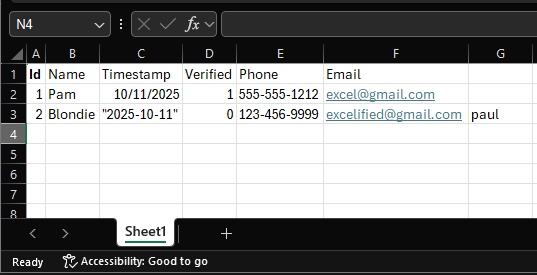
So when our spreadsheet looks like this
Here’s how our code prints the data in LINQPad
Exploring Alternatives to Excel Interop in .NET: Free, Paid, and Hybrid Options for LINQPad Users
As .NET developers working with tools like LINQPad for rapid scripting and data manipulation, finding reliable ways to handle Excel files without relying on Microsoft Office Interop is essential. Interop requires Excel installed on the machine, which isn’t always feasible in server environments or cross-platform setups. In this post, we’ll explore several alternatives, categorized by their status and licensing. These libraries enable reading, writing, and querying Excel files in C# code, perfect for LINQPad prototypes.
Paid Commercial: IronXL
IronXL is a commercial .NET Excel library designed for creating, editing, and converting Excel documents without needing Microsoft Office or Interop. Available via NuGet as IronXL.Excel, it supports XLS, XLSX, CSV, TSV, and JSON formats, with features like cell manipulation, formulas, and bulk data operations. Priced with perpetual licenses starting from developer plans, it’s ideal for enterprise .NET applications but comes with costs for production use, making it a robust choice for LINQPad users needing advanced Excel automation in C#.
Free/Active: ExcelDna
ExcelDna is a free, open-source .NET library for building Excel add-ins, allowing seamless integration of C# code into Excel without complex setups. It enables creating user-defined functions, macros, and ribbon interfaces, requiring Excel installed but avoiding traditional Interop pitfalls.
Free/Active: ClosedXML
ClosedXML is an active, free .NET library for manipulating Excel 2007+ files (XLSX, XLSM) using the OpenXML API, without needing Excel installed. It provides an intuitive interface for reading, writing, and editing spreadsheets, including cell values, formulas, and large dataset handling with performance benchmarks for millions of rows.
Hybrid (Free Personal, Paid Commercial): EPPlus
EPPlus is a hybrid-licensed .NET library for creating and editing Excel spreadsheets, free for non-commercial use under Polyform Noncommercial but requiring paid licenses for business applications. It supports advanced features like charts, pivot tables, and conditional formatting without Office installation, built on OpenXML.
Abandoned: NPOI
NPOI is an open-source .NET library for reading and writing Microsoft Office formats like XLS, XLSX, and DOCX without requiring Office installation or COM Interop. As the .NET port of Apache POI, it offers features such as cell styling, formulas, and data formatting, supporting both .NET Framework and .NET Core. However, recent discussions indicate potential obsolescence in some forks, with the main repository showing limited updates since late 2024, positioning it as somewhat abandoned despite ongoing community use in 2025 for basic Excel tasks in LINQPad.
Abandoned: LinqToExcel
LinqToExcel is a .NET library that allows querying Excel spreadsheets and CSV files using LINQ syntax, enabling data retrieval without full Interop dependency. It supports worksheet querying, named ranges, and property mapping, but requires the Microsoft Access Database Engine redistributable. Hosted on GitHub, the project explicitly states it’s no longer maintained, recommending alternatives, which marks it as abandoned.
Comparison Table: Key Alternatives to Excel Interop
| Library | Free for Commercial Use | Active Development | Excel Installed |
|---|---|---|---|
| IronXL | ❌ | ✅ | ❌ |
| NPOI | ✅ | ❌ | ❌ |
| LinqToExcel | ✅ | ❌ | ✅ |
| ExcelDna | ✅ | ✅ | ✅ |
| ClosedXML | ✅ | ✅ | ❌ |
| EPPlus | ❌ | ✅ | ❌ |
This comparison highlights cost models, maintenance status, and dependency on Microsoft Office, helping .NET coders choose the right tool for LINQPad workflows. For more LINQPad tips, check our other posts on .NET scripting!
Want to practice these concepts hands-on? Try LINQPad—it’s the fastest way to experiment with code, test database queries, and build your confidence for interviews. For more in-depth learning, check out our LINQPad Fundamentals course.